

This product is available natively in English, but it has automated translations for most major languages.
Contents: Benchmarking (), Red Cyan Desktop3D (\/), Settings Optimizer (⚙️)
Benchmarking ()
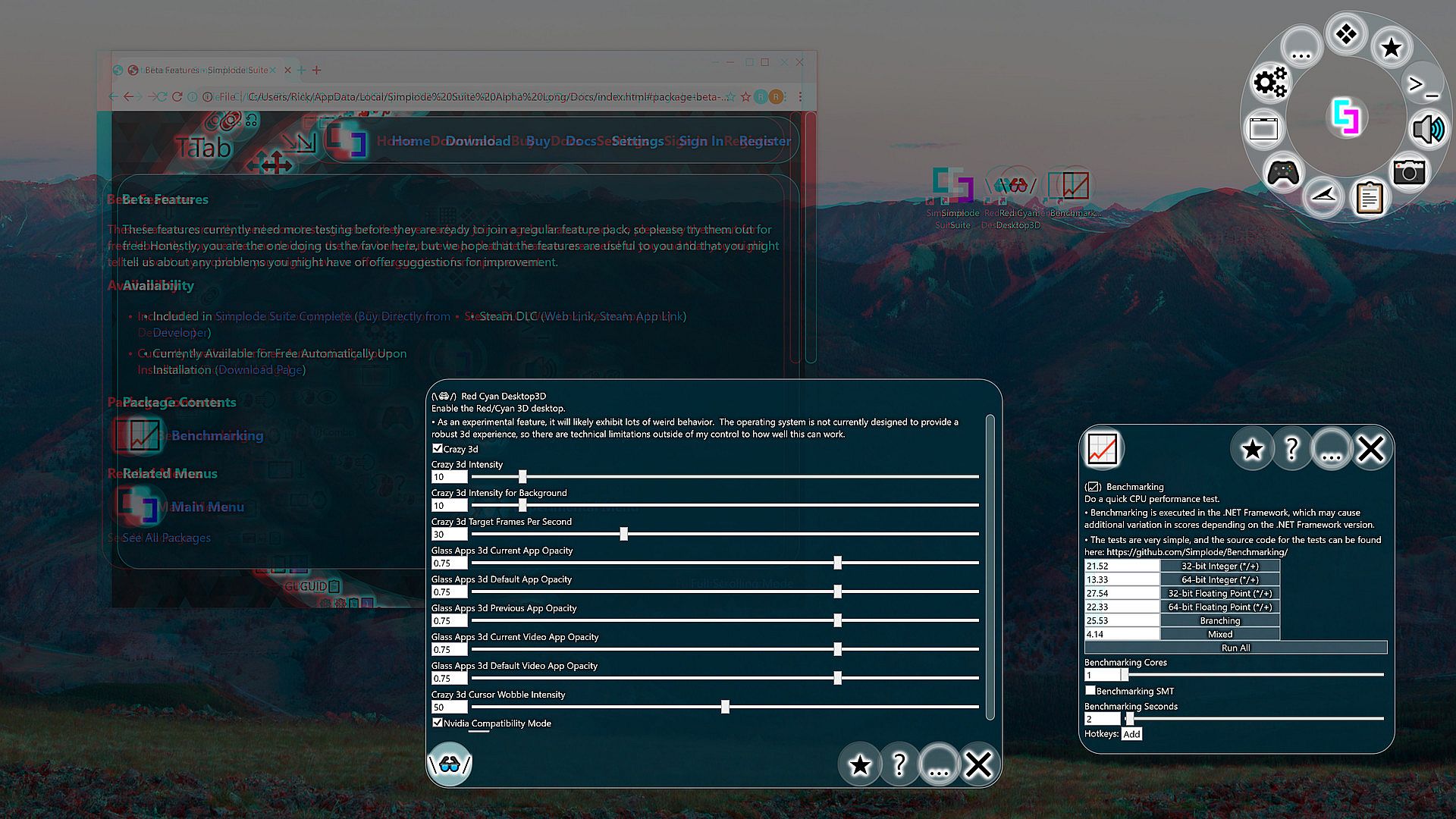
Do a quick CPU performance test.- Benchmarking is executed in the .NET Framework, which may cause additional variation in scores depending on the .NET Framework version.
- The tests are very simple, and the source code for the tests can be found on our website.
- Benchmarking Cores (Default: 1)
- Benchmarking SMT (Default: False)
Uses simultaneous multi-threading (also known as hyper-threading on Intel) when benchmarking. - Benchmarking Seconds (Default: 2)
Red Cyan Desktop3D (\/)
Enable the Red/Cyan 3D desktop.- As an experimental feature, it will likely exhibit lots of weird behavior. The operating system is not currently designed to provide a robust 3d experience, so there are technical limitations outside of my control to how well this can work.
- Crazy 3d (Default: False)
Enables the Red Cyan Desktop 3D feature. Have fun! - Crazy 3d Intensity (Default: 10)
This setting controls the amount of shift that occurs between the two eyes. Higher values will usually increase the 3d feeling, but at a certain point you will see double and the 3d effect goes away. - Crazy 3d Intensity for Background (Default: 10)
This setting controls the amount of additional shift for the desktop background. - Crazy 3d Target Frames Per Second (Default: 30)
Some systems may not be powerful enough to handle this feature at high frame rates, so lower this value can help the feature work properly by reducing the frame rate. The operating system components/drivers were not really designed to be used like this, so even very beefy systems may experience poor performance. - Crazy 3d V Sync (Default: False)
If enabled, will attempt to synchronize the 3d effect to the refresh rate of your monitor. This will override your target framerate. - Glass Apps 3d Current App Opacity (Default: 0.75)
Adjusts the transparency of the focused window. Values closer to 1 are less transparent. Values closer to 0 are more transparent. - Glass Apps 3d Default App Opacity (Default: 0.75)
Adjusts the transparency of the windows which are not already affected by another transparency option. Values closer to 1 are less transparent. Values closer to 0 are more transparent. - Glass Apps 3d Previous App Opacity (Default: 0.75)
Adjusts the transparency of the previously focused window. Values closer to 1 are less transparent. Values closer to 0 are more transparent. - Glass Apps 3d Current Video App Opacity (Default: 0.75)
Adjusts the transparency of the focused window, overridden when video is detected. Values closer to 1 are less transparent. Values closer to 0 are more transparent. - Glass Apps 3d Default Video App Opacity (Default: 0.75)
Adjusts the transparency of the video detected windows which are not already affected by another transparency option. Values closer to 1 are less transparent. Values closer to 0 are more transparent. - Crazy 3d Cursor Wobble Intensity (Default: 50)
If greater than 0, will proportionally cause the 3D effects to shift according to the cursor position to give a more immersive 3d feel. - Nvidia Compatibility Mode (Default: True)
The 3D desktop feature has some trouble on Nvidia cards. This option enables some modifications that I added to reduce that trouble.
Settings Optimizer (⚙️)
Quickly make some useful adjustments to your operating system.Settings:
- Disable Cortana (Default: False)
Attempts to block Cortana in the operating system start menu.
Works by setting the registry key HKEY_CURRENT_USER\Software\Microsoft\Windows\CurrentVersion\Search\CortanaConsent to DWORD 0. - Disable Start Menu Web Search (Default: False)
Attempts to block the operating system from automatically performing web searches when searching the start menu.
Works by setting the registery key HKEY_CURRENT_USER\Software\Microsoft\Windows\CurrentVersion\Search\BingSearchEnabled to DWORD 0
This setting appears to have been superceded in the latest versions of the operating system, try the Disable Cortana option instead. - Disable Connected Web Search (Default: False)
Attempts to block the operating system from automatically performing web searches when searching the start menu.
Works by setting the registry key HKEY_LOCAL_MACHINE\SOFTWARE\Policies\Microsoft\Windows\Windows Search\ConnectedSearchUseWeb to DWORD 0
The setting appears to have been superceded in the latest versions of the operating system, try the Disable Cortana option instead. - Disable Sliding Lock Screen (Default: False)
If enabled, the lock screen will directly open to the password entry, so you do not have to do an unnecessary slide action.
Works by setting the registry key HKEY_LOCAL_MACHINE\SOFTWARE\Policies\Microsoft\Windows\Personalization\NoLockScreen to DWORD 1 - Disable Shake to Minimize (Default: False)
If enabled, shaking the mouse while moving a window will no longer cause all apps to minimize.
Works by setting the registry key HKEY_CURRENT_USER\SOFTWARE\Microsoft\Windows\CurrentVersion\Explorer\Advanced\DisallowShaking to DWORD 1